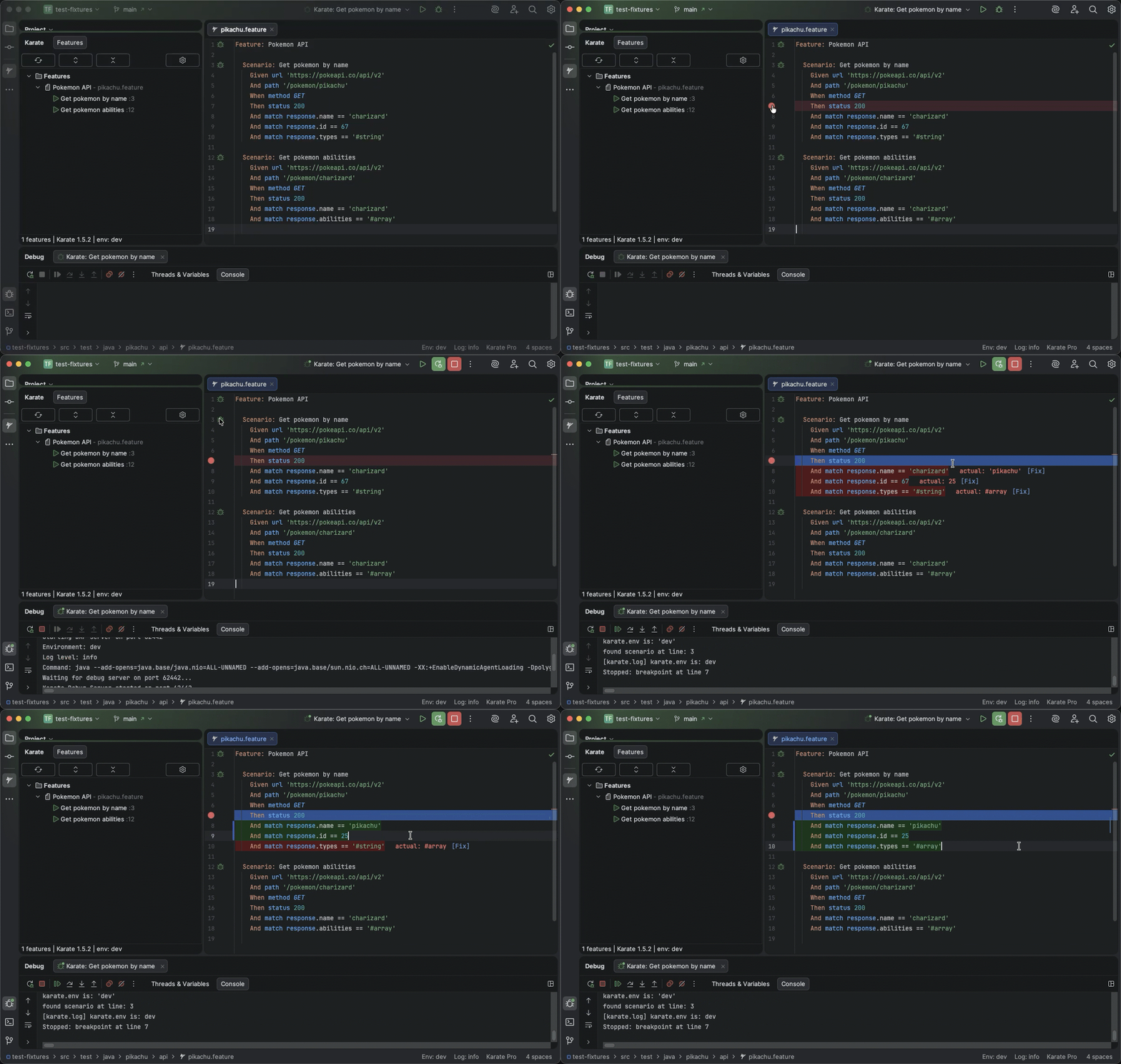
Breakpoints, variable inspection, hot-swap values, match diagnostics with one-click fixes, and environment switching—without rewiring your project.
Powerful debugging tools designed specifically for Karate API testing
Set breakpoints in your .feature files and step through tests line by line. Inspect variables, view request/response data at each step.
Modify variable values on-the-fly while paused at a breakpoint. Test different scenarios without restarting your test.
Debug buttons appear above every Feature and Scenario. Click to run — no configuration required.
Browse all your Karate features and scenarios in a dedicated sidebar. Navigate your test suite and run any test from the tree view.
Quickly switch between environments (dev, qa, stage) from the status bar. Your selection persists across sessions.
Real-time validation of Karate match expressions with inline error highlighting and quick fixes.
Clickable file references throughout your feature files. Cmd+Click (Mac) or Ctrl+Click to jump to files, tags, or cross-file references instantly.
Pause execution when specific strings appear in log output. Catch exceptions or error messages without setting traditional breakpoints.
Hide noisy log output by configuring exclude patterns. Filter out verbose framework messages to focus on what matters during debugging.
Debug Karate, Java, and JavaScript in a single unified session. Step seamlessly between your feature files, Java helpers, and inline JS code.
See variable values displayed directly next to your code while debugging. No need to hover or check the Variables panel.
Same powerful debugging experience across both IDEs
| Feature | IntelliJ IDEA | VS Code |
|---|---|---|
| Breakpoint Debugging | ✓ | ✓ |
| Hot Reload Variables | ✓ | ✓ |
| One-Click Test Execution | ✓ | ✓ |
| Test Explorer / Tool Window | ✓ | ✓ |
| Environment Switching | ✓ | ✓ |
| Match Expression Diagnostics | ✓ | ✓ |
| Syntax Highlighting | ✓ | ✓ |
| File Navigation (Cmd/Ctrl+Click) | ✓ | ✓ |
| Log Breakpoints | ✓ | ✓ |
| Log Filtering | ✓ | ✓ |
| Conditional Breakpoints | ✓ | Coming Soon |
| Polyglot Debugging (Karate + Java + JS) | ✓ | ✓ |
| Inline Variable Values | Coming Soon | ✓ |
No complex setup. No configuration files. Just install and start debugging.
Search "Karate Debug" in IntelliJ Plugins or VS Code Extensions
Navigate to any Karate feature file in your project
Click the debug icon or button next to any Scenario
Your 30-day trial starts automatically — no sign-up needed
Free to install. Full features for 30 days. Then $9.99/month if you keep using it.
Everything you need to know about Karate Debug
No. All debugging happens locally on your machine. We never see, access, or store your code, tests, or test data.
No! Your free trial starts automatically when you install the plugin. GitHub sign-in is only required if you decide to purchase a Pro subscription.
Yes. Once activated, Karate Debug works fully offline. An internet connection is only needed for the initial activation and periodic license checks.
IntelliJ IDEA 2023.1+ or VS Code, Java 17+ (21 recommended), and a Maven or Gradle project with Karate dependencies. Tests should be in src/test/java or src/test/resources.
Pro subscribers can activate on up to 5 machines. Plus your license works across both IntelliJ and VS Code—each installation counts as one activation.
You can subscribe to Pro for $9.99/month to continue using all features. No sign-up or credit card is required to start the trial.
Join test automation engineers who are saving hours every day with Karate Debug.